This web page was created programmatically, to learn the article in its unique location you possibly can go to the hyperlink bellow:
https://specterops.io/blog/2025/09/18/more-fun-with-wmi/
and if you wish to take away this text from our website please contact us
TL;DR Win32_Process has been the go to WMI class for distant command execution for years. In this put up we are going to cowl a brand new WMI class that capabilities like Win32_Process and presents additional functionality
From time to time, throughout completely different variations of Windows, I like to check out Windows Management Instrumentation (WMI) lessons to see if any attention-grabbing lessons and strategies exist to carry out explicit actions. One of the issues that I search for are strategies I might use for normal post-ex functionality.
To take a deeper dive into WMI for brand spanking new alternatives, we have to have an thought of what we already know by way of a method like lateral motion. Current lessons and their strategies embrace:
- Process – Win32_Process (Create)
- Service – Win32_Service (Create/BeginService or Change)
- Job – Win32_ScheduledJob (Create)
- Task – PS_ScheduledTask (New)
- Product – Win32_Product (Install)
- Performance – Win32_PerfData/Win32_PerfRawData
- Custom/Malicious WMI Provider
- Derived Class
- Event Subscription
While looking, I got here throughout some attention-grabbing lessons and their strategies that reach the lessons above. I’ll solely cowl one presently, resulting from among the different potential candidates not being absolutely fleshed out.
MSFT_MTProcess
MSFT_MTProcess is the closest WMI class that I’ve seen to Win32_Process. Win32_Process is the canonical instance of WMI lateral motion and is what most individuals consider when discussing lateral motion with WMI. MSFT_MTProcess has a technique known as CreateProcess that accepts a command-line argument very like Win32_Process. However, a giant caveat to this class is that it solely exists on Windows Server 2016 and newer. This means it’s not out there when trying lateral motion to workstations, however it’s going to set off execution of a given binary/file like Win32_Process. What is sweet about that is that the setup is simply as straight ahead as Win32_Process, with an argument being handed to a binary, in contrast to one thing like Win32_PerfData which takes slightly little bit of setup. This explicit class is within the .RootMicrosoftWindowsManagementTools namespace.
MSFT_MTProcess Part 2
A second attention-grabbing technique for MSFT_MTProcess is CreateDump. You can leverage this class to create a dump of a given course of. If you need to remotely (or regionally) create a dump of a course of with out including any new tooling, then you possibly can leverage MSFT_MTProcess’s CreateDump technique. Again this class solely exists on Windows Server 2016 or later. This signifies that if you wish to get a course of dump of everybody’s favourite course of (i.e., lsass.exe) and take it offline to extract knowledge, you possibly can. Does this class provide an attention-grabbing or novel means of dumping a course of? No. This class follows the identical method as Task Manager the place you possibly can proper click on a course of and create a course of dump. This hundreds dbghelpd.dll and calls MiniDumpWriteDump on the occasion of the method you give it. This does make sense, since this WMI supplier is named the Task Manager Provider; nonetheless the method execution chain is slightly completely different. Rather than Task Manager loading the DLL, you’ve WmiPrvSe accomplished the load and making the perform name.

MSFT_MTProcess on Workstations
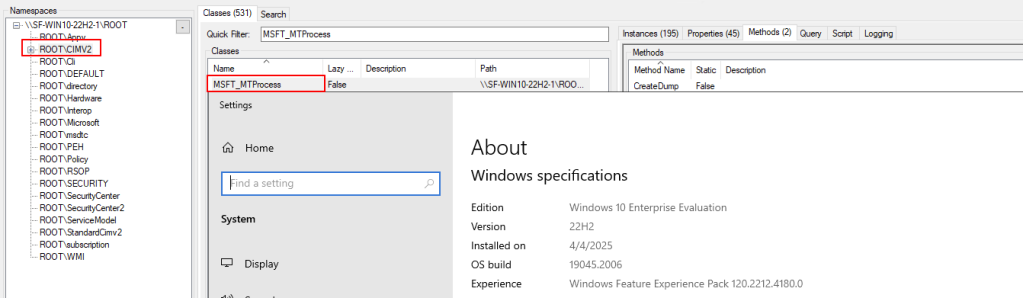
I did pass over an vital notice about MSFT_MTProcess above. Earlier, I said that it’s going to solely work on Windows Server 2016 and better. By default, that’s nonetheless true; nonetheless, we are able to make it work on Windows workstation working programs as effectively. There are two most important elements to this. First is the supplier dynamic-link library (DLL); this WMI class supplier is mttmprov.dll. Second, is the MOF file which will probably be used for all the parameters and related knowledge for the WMI class. With a few steps, we are able to take these two offered recordsdata and set up them to a Windows 10/11 host and achieve performance of dumping a course of or executing a program via the category’s beforehand talked about strategies.
First, we write the supplier DLL and MOF file to C:WindowsSystem32wbem on the goal host. From there, we are going to need to set up the MOF file in order that the category is created within the WMI database and turns into usable. To do that, we’d need to use one thing like:
mofcomp.exe C:WindowsSystem32wbemmttmprov.mof
Technically, we don’t have to make use of mofcomp. We might use pure WMI to do that, however you lend your self to encountering points by doing this. Lastly, we would want to register the COM CLSID manually by creating some registry keys. Once you full all of those steps, the category turns into out there to be used.

This whole course of is just like putting in a malicious WMI Provider talked about above within the checklist of identified lateral motion strategies; nonetheless, reasonably than being overtly malicious, it’s an current respectable Windows WMI supplier very like Win32_Process’s supplier.
Tooling
Since there’s a new usable class listed above, it will not be very helpful if there wasn’t tooling out there for it. I’ve created two instruments that implement the lessons above and slightly bit extra: WMI_Proc_Dump.py and mtprocess.py.
WMI_Proc_Dump.py is a instrument that makes use of the MSFT_MTProcess class to dump a course of remotely when concentrating on Windows Server 2016 or increased (or Windows workstation OS in case you have put in MT Process supplier). This will name MSFT_MTProcess to dump the method, which is able to routinely write

Mtprocess.py is the second script being launched that implements the CreateProcess technique of the MSFT_MTProcess class. Additionally, this script supplies an automatic approach to set up theMSFT_MTProcess class to a workstation host.


One main downside of the implementation was that to ensure that this to be accomplished remotely, I used Win32_Process to name mofcomp.exe on the MOF file. This is a little bit of a hen and egg downside, as a result of the purpose of including MSFT_MTProcess is to get away from Win32_Process. Additionally, the MOF file adjustments the namespace from .RootMicrosoftWindowsManagementTools to .RootCIMv2 since that namespace doesn’t exist on the Windows workstation working system.
WMI_Proc_Dump might be discovered right here and mtprocess might be discovered right here https://github.com/0xthirteen/mtprocess.
Conclusion
Win32_Process has been the de facto WMI class for many lateral motion and continues to be used as we speak. Over time, there have been different strategies of attaining nearly the identical performance with different lessons. However, usually different necessities are wanted to achieve success and generally could be a bit cumbersome. The MSFT_MTProcess class is the closest alternative class for Win32_Process that I’ve seen on any Windows host, and is put in by default on any 2016 and better server OS variations. There are native Windows utilities that make putting in this WMI supplier on non server OS’s quite simple, and this may even be accomplished remotely. And as a bonus, this supplier additionally presents methods of getting course of dumps of a given course of occasion. Both of those strategies make this class helpful for offensive use instances.
Post Views: 195
This web page was created programmatically, to learn the article in its unique location you possibly can go to the hyperlink bellow:
https://specterops.io/blog/2025/09/18/more-fun-with-wmi/
and if you wish to take away this text from our website please contact us